

MongoDB is a document-oriented NoSQL database that stores records as flexible JSON-style documents inside collections. Connecting MongoDB to Parabola lets data and ops teams pull production records into reports, reconciliations, and alerts that combine MongoDB with the rest of the stack, without writing a custom ETL pipeline or waiting on engineering.Documentation Index
Fetch the complete documentation index at: https://parabola.io/docs/llms.txt
Use this file to discover all available pages before exploring further.
Pull from MongoDB
The Pull from MongoDB step connects to a MongoDB database and pulls a collection into your flow as rows. Each document arrives as a row, with nested JSON preserved in the cell so you can expand it downstream.How to authenticate
Click Authorize and enter your connection details: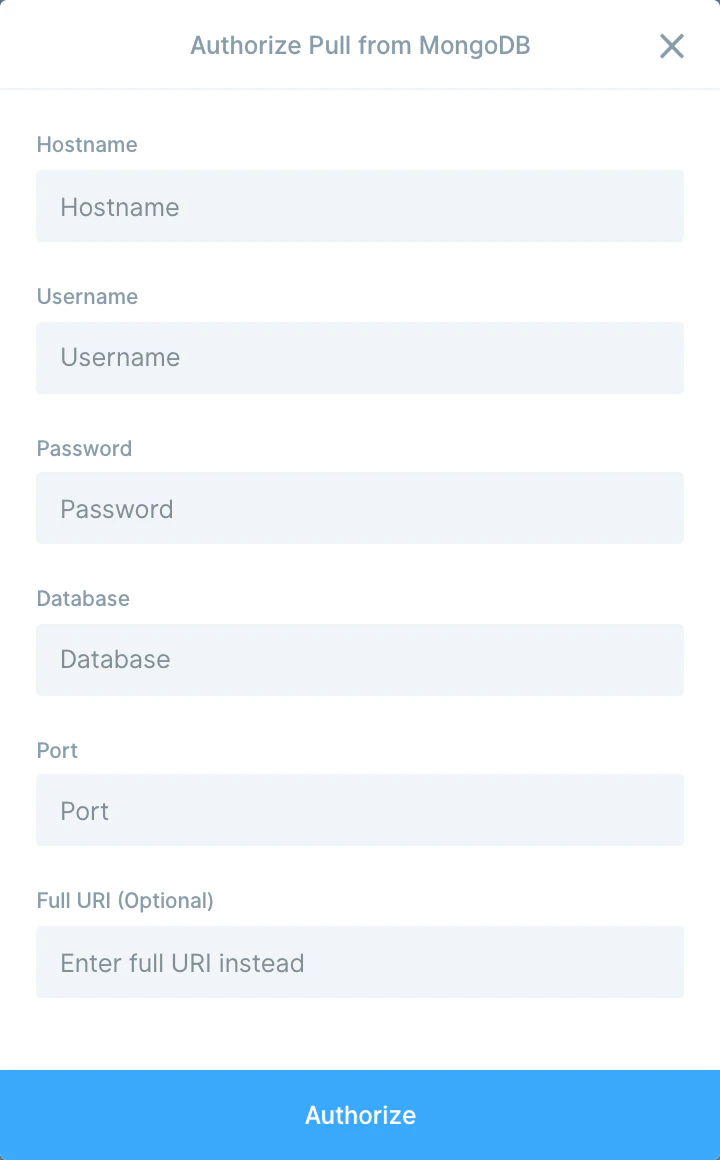
- Hostname
- Username
- Password
- Database
- Port
- Full URI (optional) — paste the full MongoDB connection URI instead of filling out the fields above. Useful for replica sets and Atlas clusters.
Available data
The Pull from MongoDB step can pull any collection in the connected database:- Collections — every document in the selected collection arrives as a row. Top-level fields become columns; nested objects and arrays land as JSON in a single cell.
- Embedded documents — preserved as JSON. Use Parabola’s Expand JSON or Split column step to break nested structures out into their own columns or rows.
- Object IDs and timestamps — MongoDB
_idandcreatedAt/updatedAtfields come through as strings, ready to use as join keys or filters.
Common use cases
- Join app data with e-commerce orders: Pull customer or order documents from MongoDB and join them with Shopify, Amazon Seller Central, or Squarespace data so growth and ops teams can see the full picture in one report.
- Push MongoDB data into a warehouse: Send cleaned, flattened collections into Snowflake, BigQuery, or Redshift so analysts can query app data alongside the rest of the business.
- Reconcile billing and subscription data: Compare MongoDB subscription records with Stripe charges or QuickBooks Online entries to catch missed renewals and revenue gaps.
- Build ops dashboards from app events: Pull product event collections, aggregate by user or feature, and drop the result in Google Drive or Smartsheet for a weekly review.
- Trigger Slack alerts on document state changes: Watch a MongoDB collection on a schedule and send a Slack message when status fields flip (a refund is logged, a support escalation is opened, an inventory record drops below threshold).
- Sync MongoDB users into marketing tools: Pull user documents and push them into Klaviyo, Mailchimp, or HubSpot so lifecycle campaigns reach the right audience without engineering work.
Tips for using Parabola with MongoDB
- Use the full URI for Atlas and replica sets. The discrete fields work for simple connections, but the full connection string is the most reliable way to connect to MongoDB Atlas, replica sets, or anything that requires extra connection options.
- Expand JSON early. Documents with nested arrays or objects come in as JSON. Add an Expand JSON step right after the pull to break the structure into rows and columns you can transform.
- Filter at the source when possible. Pulling an entire collection on a large database is slow. If you can, build a smaller working collection or view in MongoDB and point Parabola at that.
- Allow-list Parabola’s IPs. If your MongoDB instance restricts inbound traffic (Atlas Network Access, firewall rules), add Parabola’s IP ranges so the connection isn’t blocked.
- Watch for type coercion. MongoDB stores ints, longs, dates, and ObjectIds as distinct types. Parabola treats values as strings by default, so cast or format them with a Calculation or date step before joining to other sources.
- Match cadence to use case. Hourly for ops alerts, daily for reporting, weekly for cohort analysis. Schedules live on the flow.
FAQ
Can I push data back into MongoDB?
The native step is read-only. To insert or update documents, use a Send to an API step pointed at your MongoDB Data API endpoint, or write to a staging collection from another system that MongoDB syncs from.How do I pull only part of a collection?
Pull the collection, then add a Filter rows step on the field you care about (createdAt, status, customerId). For very large collections, build a filtered view in MongoDB and point Parabola at that view instead.Does Parabola support MongoDB Atlas?
Yes. Use the Full URI field with your Atlas connection string, and add Parabola’s IP ranges to your Atlas Network Access list so the connection is allowed.How do I work with nested documents and arrays?
Pull the collection, then use the Expand JSON step to break nested objects into columns, or Split column to break an array into multiple rows. From there you can transform the data the same way you would any other source.With MongoDB and Parabola connected, the production data trapped in your app database becomes another source the rest of the business can use, without exports, custom scripts, or engineering tickets.