

The Run another Parabola flow step triggers a different Parabola flow from inside the current one. Use it to chain flows together, split a large flow into pieces, or fan out work across many runs.Documentation Index
Fetch the complete documentation index at: https://parabola.io/docs/llms.txt
Use this file to discover all available pages before exploring further.
Running other flows
Pick the flow you want to trigger. By default, no data passes through this step — it’s just a trigger.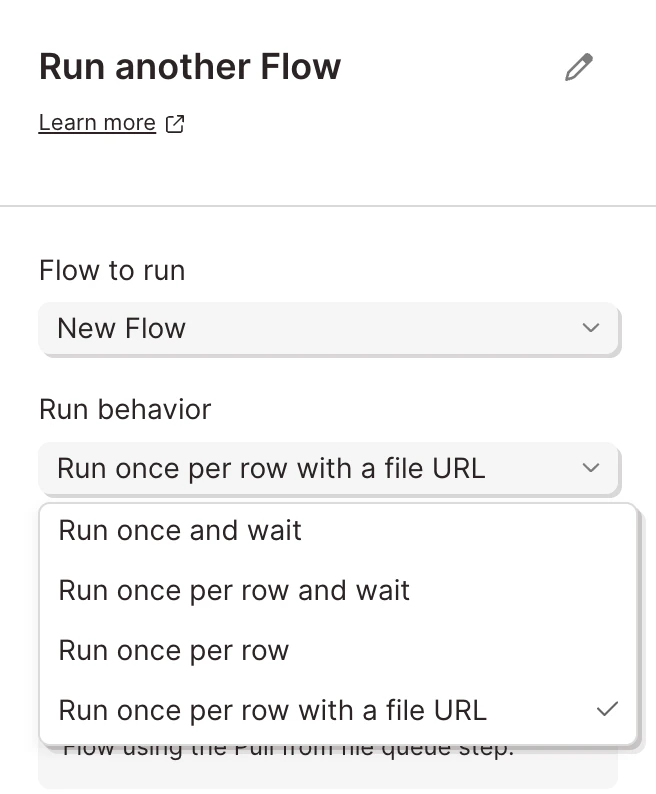
wait block until the second flow completes; the rest fire-and-forget.
Using this step in a flow
This step works with or without input arrows. Without input arrows, it runs first. With input arrows, it runs in normal flow order. Theper row options require input arrows.
Helpful tips
- Available on the Advanced plan only.
- Use it to break up large flows. When a single flow gets too tangled to debug, split it into upstream and downstream pieces and chain them with this step.
- The downstream flow must be published. If you don’t see a flow in the dropdown, confirm it has a live version.
- Per-row mode pairs with Pull from file queue. If you need to process many files (PDFs, CSVs) in a single run, pair Run another flow’s per-row mode with a downstream flow that starts with Pull from file queue.
Related steps
- Pull from file queue — the downstream step that receives the file URL and row data
- Send to Parabola Table — to share data between flows via a persistent table instead of a per-row trigger
- Webhooks — for triggering Parabola flows from outside Parabola